Essentials
Just make it work
~230K
Ads, trackers, and malware — safe for everyone.
Block ads, trackers, and noisy sites across your Mac in one click. SaneHosts keeps everything local and lets you choose how much to block.
All features for 14 days. No credit card required. Buy once after the trial.
Buy SaneHosts onceThe 1-minute demo — real app on screen, no mockups.
One-Time Purchase
$14.99*
Every feature is available for 14 days. Buy once to keep using SaneHosts.
Buying more than one SaneApps Mac app?
Get the Everything Bundle for $34.99 once. SaneClip, SaneClick and SaneHosts in one purchase.
Get the bundle See included apps →Choose a protection level. Hit activate. SaneHosts handles the rest.
SaneHosts is a direct Mac download because hosts-file protection needs local system access. You approve its helper once in System Settings with your Mac password. After that, changes apply without asking again, and SaneHosts keeps backups so you can roll back. Want it locked? Turn on the optional Touch ID lock, and turning protection off or switching profiles asks for Touch ID or your Mac password.
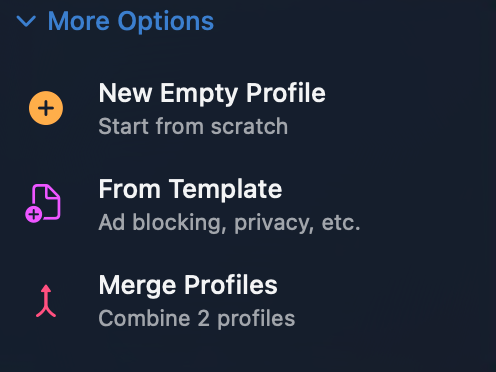
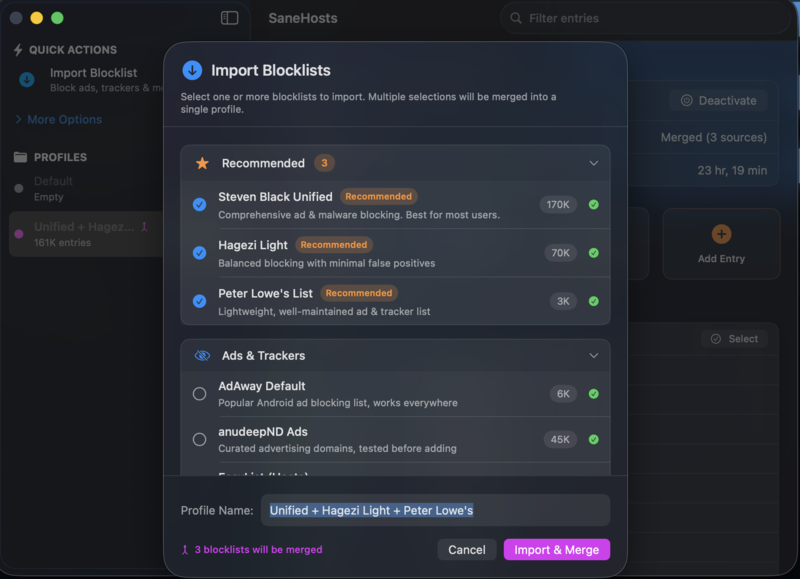
Custom profiles. Hand-picked blocklists from security researchers. Import your own hosts file or URL. Merge protection levels or build from scratch.
New in 1.1.27
Always Allow from any entry, one-click list updates, and Allowed Sites that cover subdomains.
Guides: unblock one site · keep lists current · lock it with Touch ID
Real capture, no mockups
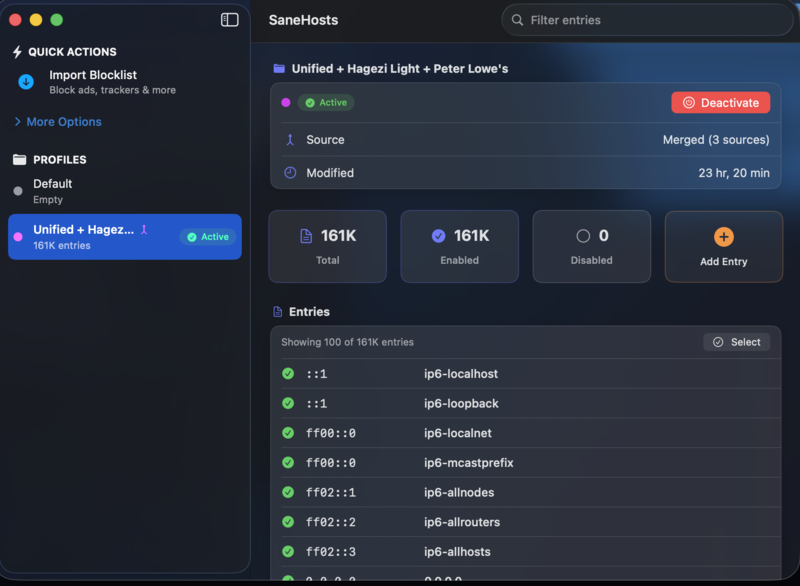
186K entries active, plus a curated catalog one checkbox away.
Sold? Start the 14-day trial — no credit card required.
Five curated levels. Each bundles the right blocklists for your needs. Choose one and go.
| Level | What It Blocks | Entries |
|---|---|---|
|
Essentials Just make it work |
Ads, trackers, and malware — safe for everyone | ~230K |
|
Family Safe Protect the kids |
Essentials + adult content and gambling sites | ~315K |
|
Focus Mode Get stuff done |
Family Safe + social media distractions | ~320K |
|
Privacy Shield Reduce telemetry |
Focus Mode + data collection and advanced trackers | ~355K |
|
Kitchen Sink Block everything possible |
Maximum protection — blocks everything possible | ~500K |
Ads, trackers, and malware — safe for everyone.
Essentials plus adult content and gambling sites.
Family Safe plus social media distractions.
Focus Mode plus data collection and advanced trackers.
Maximum protection for users who want the strongest blocklist set.
30 curated blocklists from Steven Black, Hagezi, AdGuard, and more.
Pick a protection level. Click activate. Done. No Terminal, no commands, no manual editing.
Every app, not just browsers. Safari, Chrome, Slack, games — all protected at the system level.
Your hosts data stays on your Mac. No cloud account. No personal-content upload. Automatic backups protect your profiles from corruption.
Create profiles for different contexts — work, family, focus. Switch instantly from the menu bar.
DNS cache cleared automatically when you activate or switch profiles. Changes take effect immediately.
Approve SaneHosts once in System Settings. Add the optional Touch ID lock if you want switching or turning it off to ask first.
A list breaks a site you need? Right-click it and choose Always Allow. It stays unblocked on every profile, subdomains included.
Update Now on any list-based profile, or let SaneHosts refresh the active profile every week. If a list fails to download, nothing changes.
Import a hosts file from your Mac or any HTTPS list. File-based profiles refresh from the file with one click.
No VPN. No cloud. No subscription. Just your Mac's built-in hosts file, made usable.
| SaneHosts | Browser Extensions | VPN Blockers | |
|---|---|---|---|
| Works in all apps | ✓ | ✗ | ✓ |
| Hosts data stays local | ✓ | ✗ | ✗ |
| No subscription | ✓ | ✓ | ✗ |
| No speed impact | ✓ | ✓ | ✗ |
| macOS auth protected | ✓ | ✗ | ✗ |
| Transparent Code | ✓ | Some | ✗ |
Officially recognized by the community.
SaneHosts is proud to be an officially listed tool in the StevenBlack/hosts repository, the gold standard for unified hosts files. SaneHosts is committed to maintaining the highest standards of safety and compatibility.
$14.99 once after a 14-day trial with every feature and no credit card. There's no subscription. It's also in the $34.99 SaneApps Bundle.
It manages your Mac's built-in hosts file, which apps check before asking DNS. Domains on your chosen blocklists point nowhere, so Safari, Chrome, Slack and games all skip them. No VPN and no proxy.
Hosts lookups happen on your Mac before any network request, and there's no VPN or proxy in the path, so your traffic isn't routed anywhere else.
Right-click the entry and choose Always Allow, or add the site under Allowed Sites. Allowed sites, and their subdomains, stay unblocked on every profile, even after the lists update.
Yes. Click Update Now on a profile, or leave weekly updates on in Settings and SaneHosts refreshes the active profile in the background. If a list can't be downloaded, nothing changes.
You approve SaneHosts once in System Settings, and it changes only the hosts file. SaneHosts keeps automatic backups you can roll back to and flushes the DNS cache for you, and Turn Off Protection switches blocking off at any time.
It blocks by domain, so it can't stop ads served from the same domain as the content, and it doesn't hide empty ad boxes inside web pages. A browser extension can cover that part.
Yes. Gas Mask's last release (0.8.6) was in February 2020 and is Intel-only. SaneHosts is native on Apple silicon, with 30 curated blocklists and five protection levels. Compare hosts managers.
macOS 14 Sonoma or later. SaneHosts is a direct download (or brew install --cask sane-apps/tap/sanehosts), because writing the system hosts file needs local system access.
Simple Mac utilities that respect your time and privacy.
Support with Crypto

3Go9nJu3dj2qaa4EAYXrTsTf5AnhcrPQke

0x026668feA51c27F0803055B8c0d881ac2F1e7C3e

FBvU83GUmwEYk3HMwZh3GBorGvrVVWSPb8VLCKeLiWZZ

t1PaQ7LSoRDVvXLaQTWmy5tKUAiKxuE9hBN
Click any address to copy